

Save time on editing
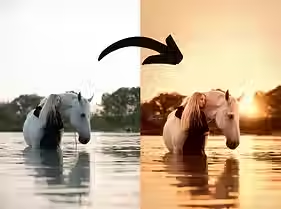
Edit your photos with one click
Create a consistent style
Do you want to edit your horse photos faster and more professionally, without the hassle?
With this complete Photoshop Actions package, you’ll get my personal workflow in your hands exactly the way I edit my own images.
From basic corrections to creative fine-tuning: with just one click, you can apply professional adjustments. Think of camera raw color tones, lighten model, warm highlights, brown glow, accentuate brown tones, and many more. Even the finest details come to life with actions like brighten eye (dodge & burn), contour shadows, and soften background.
Everything in this package is specially developed for equine photography, so you can work faster while achieving consistent, atmospheric results.
Danielle v.G.
“I love how easy these actions are to use. With just a few clicks, my photos go from flat to breathtaking. The eye dodge & burn and coat texture actions are my absolute favorites.”
Sophie W.
“This actions pack has completely transformed the way I edit my horse photos! Everything is so much faster and the results look super professional. The warm tones and glow effects give my photos exactly the atmosphere I was always looking for.”
Monica W.
“What do I think of them? Amazing this investment is definitely worth the money. With these actions, I’ve been able to give my edits a beautiful style. Definitely worth trying!”
Contents
15 adjustable actions for Adobe Photoshop CC
✔ Camera raw color toning
✔Brighten horse
✔Brighten eye (dodge burn)
✔Darken eye (dodge burn)
✔Enhance horse texture
✔Contour shadows
✔Contouren glow horse
✔Balance warm tones
✔Vignette
✔Warm highlights
✔Brown glow
✔Accentuate brown tones
✔Yellow sky
✔Sharpen
✔Blur background
Frequently asked questions
What are Photoshop actions?
Actions are automated steps in Photoshop. With just one click, you can apply an edit to your photo – making your workflow much more efficient.
They’re perfect for giving your photos that special finishing touch, while still being able to adjust them to your own style.
Make things easy for yourself and save time.
How do I download the actions?
The actions are available for immediate download as a zip file. You’ll find the download link in the confirmation email of your order.
How do I import the actions into Photoshop?
Once downloaded, you’ll find the zip file in your computer’s downloads folder. First, unzip the folder with the actions.
In Photoshop, go to ‘Window’ → ‘Actions’. From the dropdown menu, choose ‘Load actions’ and then select all the actions you want to import.
They’re now ready to use!